This week I learned more about CSS Grid and worked on my midterm design project. CSS Grid was a little confusing at first, but after practicing with it, I started to understand how it works and how it can help organize a page.
Continue reading “CSS Grid and Midterm Project”Tag: midterm
Adapting with CSS
It can be crazy to think about now, but computers used to be the only device we used to access the web. There was hardly a need to consider screen size when creating a website. Now we have smart fridges with internet access.
Continue reading “Adapting with CSS”Midterms, Midterms…and More Midterms
This week has been a doozy.
Continue reading “Midterms, Midterms…and More Midterms”Figuring out Figma & Ditto Clipboard
Using Figma to design my microsite has gone very smoothly, if you ignore my mess of layers and the random slivers of empty space that like to appear and disappear along the edges of my project.
Continue reading “Figuring out Figma & Ditto Clipboard”Midterm, Midpoints, and Madness
Midterm: Sorted. Midpoint: Reached. Now, I need to figure out how to keep myself occupied for the next two weeks.
Continue reading “Midterm, Midpoints, and Madness”Week 5 & 6 Layout Techniques
These last two weeks have been a challenge! I had never even heard of grid, positioning, or floats, until this course. This is all very new and a bit overwhelming, but I am determined to understand it to the best of my abilities.
Continue reading “Week 5 & 6 Layout Techniques”A Fortnight of Figma
This class is helping me put my impostor syndrome to bed. The past two weeks have been a productive and rewarding experience. Most notably, I’ve been getting back into making designs in Figma, and this time, I actually know what I’m doing.
Continue reading “A Fortnight of Figma”I ❤️ Figma!
The past two weeks have been really productive and full of learning. I have improved my understanding of web layouts, CSS techniques, and design tools. Each week, I worked on different exercises and projects that helped me practice and apply what I learned in a meaningful way.
Week 5: Flexbox and CSS Layouts
In Week 5, we focused on Flexbox layouts and CSS positioning. I started with the Web Layout Overview & Review, which was a great refresher on structuring web pages. Then, I worked on the Flexbox Layout Challenges, which helped me practice arranging elements efficiently.
One of the most interesting tasks was the Convert Coffee Shop Website to Flexbox assignment. This activity helped me see how Flexbox is used in real-world layouts. I found it really useful because it made me think about how to structure a page in a more flexible and responsive way.
I also participated in the CSS Layout Discussion, where we talked about different layout strategies and how they apply to modern web design. It was helpful to hear different perspectives and learn from others’ experiences.
Week 6: CSS Grid and Midterm Preparation
In Week 6, we shifted our focus to CSS Grid, which is another powerful layout system. I worked on Gridspiration and the Introduction to CSS Grid & Grid Challenges. These activities helped me understand how Grid works differently from Flexbox and when to use each one.
One of the projects I really enjoyed was the Bakery Site Challenge. It required applying both Flexbox and Grid, and it made me think carefully about which layout system to use for different parts of the page. This challenge helped me feel more comfortable combining both techniques in my designs.
Midterm Project & Figma
A big part of this week was preparing for my midterm project. For my project, I decided to design a movie landing page. The assignment suggested using a new movie, but I chose my favorite movie, The Shawshank Redemption. I wanted to work on something I really enjoy, and I felt that this movie’s theme and visuals would make for an interesting design.
I used Figma to create the designs for my midterm project, and I am really happy about this. Figma is my favorite platform for web and interaction design. It allows me to organize my ideas visually, create clean wireframes, and design high-quality layouts. I feel confident using Figma because it has all the tools I need to experiment with different layouts and styles before writing any code. This step was really important because it helped me plan my project before starting the development process.
Reflections & Looking Ahead
These past two weeks have helped me build a stronger foundation in CSS layout techniques. I now feel more comfortable using both Flexbox and Grid, and I understand when to use each one. The hands-on exercises and projects were really helpful in making these concepts clearer.
Working on my midterm project in Figma was a great experience, and I am excited to move forward with the development phase. I plan to focus on making my movie landing page both visually appealing and functional.
Overall, I feel that I have learned a lot in these two weeks, and I am excited to continue improving my design and coding skills in the upcoming weeks.
Thinking of my final
This past week I have been thinking about what I want to do for my final.
Continue reading “Thinking of my final”Lisa’s Learning Journal: Week 12
When does a tool become a gimmick? (And when does a gimmick become a headache…)
The last couple of weeks have flown by a bit faster than I expected. Last week, we got to play around with Sass, which I actually had some fun with. It reminded me of my time tackling object-oriented programming a few semesters ago. Sass came more naturally to me than I thought it would. That being said, I don’t know how often I will implement Sass in my own web coding career.
Continue reading “Lisa’s Learning Journal: Week 12”AAD86 – Weeks 7 & 8
These last few weeks in Web Design have been challenging but fun! From the Concentric Design Challenge to creating our Midterm Website Design to our introduction to responsive design, we have been through a lot.
Continue reading “AAD86 – Weeks 7 & 8”Lisa’s Learning Journal: Week 8
Is the Semester Halfway Over or Halfway Begun?
The past few weeks of AAD86 have been pretty smooth. It was fun to work through the stages of the midterm project, and I had a lot of fun finalizing my design. The first taste of responsive design was interesting. I think things are going to get a little more complicated moving forward with that. The introduction of indenting in CSS is a little scary since it seems like things can get really messy really fast.
Continue reading “Lisa’s Learning Journal: Week 8”Turning Designs into Code
In the last two weeks we have been involved in visually designing websites and then practicing various code approaches implementing these designs. For example, along with visually designing our mid-term project website, we practiced various approaches in HTML and CSS.
Continue reading “Turning Designs into Code”Lisa’s Learning Journal: Week 6
Let’s talk about Flex!
Oh boy. We finally made it to flexbox. For some reason, I never cared for the flexbox layout during AAD85. I thought, “Heck, I can do this whole HTML and CSS thing without it”. I don’t know why I hated flexbox so much. Though, it is most likely because learning flexbox involves change, and change is scary.
Continue reading “Lisa’s Learning Journal: Week 6”Templates for beginners
while in class were doing our final rough drafts of the website of our choosing to create about a certain topic, mine is a lawyer website and a tool that helped me use HTML and CSS to create my page and now a helpful tool for me to reference new code or refresh on the basics.
CSS Navigation Bar (w3schools.com)
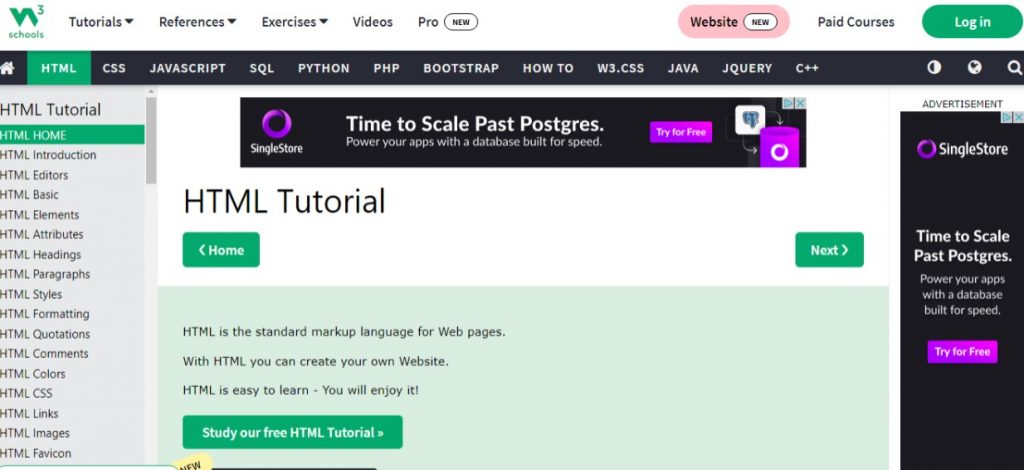
Here you can look up what you’re trying to create, and it will show you how it should look like in code and in another browser window to show a live code view of how it can look on a website screen.
New Concept and Finishing Mid-Terms
Hello once again to a journal entry! Today on the news, AAD 86’s students have been busy doing their mid-terms while balancing other classes and learning new cool concepts on the web and design. Will they be able to get their designs how they want them to be? What did they learn in the past week? Tune in on channel…. wait this is not a news casting station??? That is ok tune in for more below!
Continue reading “New Concept and Finishing Mid-Terms”Responsive Design, Midterm + Life
This week has been a definitely been a long one for me. Work has restarted and I have been in the process of moving across town into a new house when all of my major projects were due. It’s been a nightmare trying to juggle it all, but I’m slowly getting back into it again.
Continue reading “Responsive Design, Midterm + Life”Midterm and Responsive Design
This week was a doozie! A lot of learning, re-editing and, editing, and editing again – looking at the microsites, re-looking at the microsites! Midterms, half way through this semester! What a whirlwind of a learning curve.
Continue reading “Midterm and Responsive Design”Mid-Term Week
Well this mid-term project threw me for a loop for sure. I was so happy to get some peer reviews that were helpful along the way.
Continue reading “Mid-Term Week”Weeks 5 & 6 – CSS Layout Challenges, Levels of Web Design, and more
The past couple of weeks have been really busy. I guess mid-semester always is at least a bit overwhelming.
Continue reading “Weeks 5 & 6 – CSS Layout Challenges, Levels of Web Design, and more”