One of the things that I have really learned and that has helped me a lot is
Continue reading “Something I learned”Tag: web design
Lisa’s Learning Journal: Week 10
Ten weeks down, six more to go…
The last two weeks of web design have gone by smoothly. I’m enjoying the design challenges, even though they sometimes leave me with a headache. It’s fun to try and figure out how to do the CSS coding correctly. I feel more confident with my coding abilities than I did at the beginning of the semester even though I feel like I don’t know how to do much. Each step is another hurdle I am slowly tripping upon. However, I am happy with how I am progressing through the class.
Continue reading “Lisa’s Learning Journal: Week 10”AAD86 – Weeks 7 & 8
These last few weeks in Web Design have been challenging but fun! From the Concentric Design Challenge to creating our Midterm Website Design to our introduction to responsive design, we have been through a lot.
Continue reading “AAD86 – Weeks 7 & 8”Responsive Web Design and UX
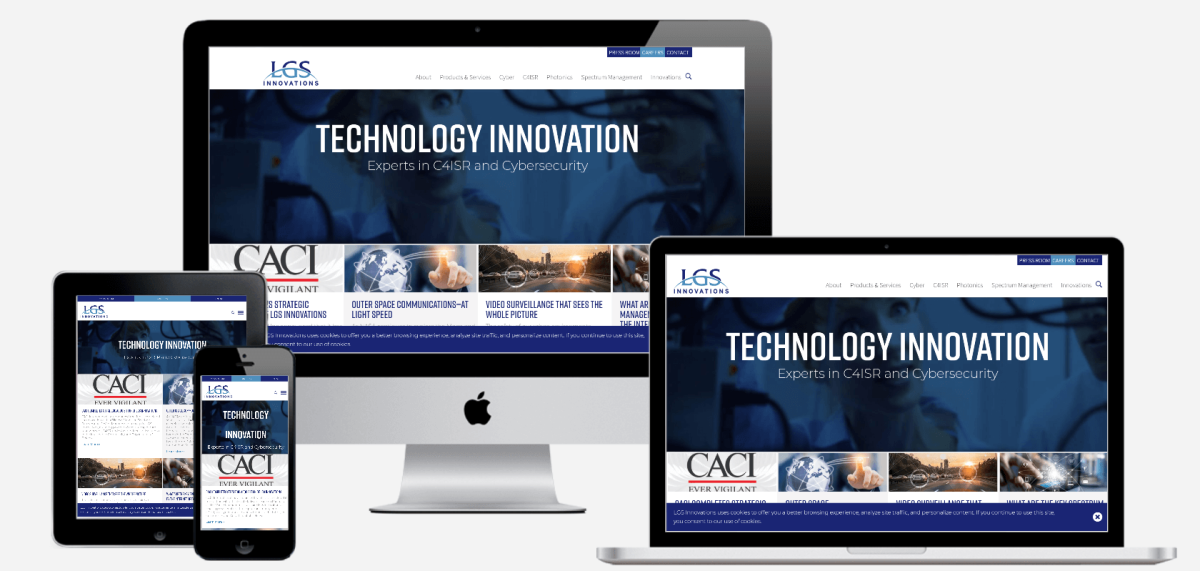
Responsive web design (RWD) refers to designing websites to adapt to a user’s device. The goal is for a website to retain its optimal usability and appearance regardless of the device it’s displayed on. Responsive web design responds to user needs by adapting to different screen sizes, orientations, layouts, and platforms. This is accomplished with the use of flexible grids and layouts, responsive images, and CSS media queries.
Continue reading “Responsive Web Design and UX”Lisa’s Learning Journal: Week 8
Is the Semester Halfway Over or Halfway Begun?
The past few weeks of AAD86 have been pretty smooth. It was fun to work through the stages of the midterm project, and I had a lot of fun finalizing my design. The first taste of responsive design was interesting. I think things are going to get a little more complicated moving forward with that. The introduction of indenting in CSS is a little scary since it seems like things can get really messy really fast.
Continue reading “Lisa’s Learning Journal: Week 8”AAD86 – Weeks 5 & 6
Now these past two weeks have definitely been interesting! There was a lot of content I didn’t know previously so it definitely felt like a curveball was thrown in my direction, just not necessarily in a bad way if that makes sense.
Continue reading “AAD86 – Weeks 5 & 6”Mastering the Art of UI Design
User Interface (UI) design is the creative process of enhancing user satisfaction by improving the usability, accessibility, and visual appeal of a digital product. In today’s tech-driven world, UI design plays a pivotal role in shaping our digital experiences, whether we’re navigating a website, using a mobile app, or interacting with software.
Continue reading “Mastering the Art of UI Design”Lisa’s Learning Journal: Week 6
Let’s talk about Flex!
Oh boy. We finally made it to flexbox. For some reason, I never cared for the flexbox layout during AAD85. I thought, “Heck, I can do this whole HTML and CSS thing without it”. I don’t know why I hated flexbox so much. Though, it is most likely because learning flexbox involves change, and change is scary.
Continue reading “Lisa’s Learning Journal: Week 6”What I learned about CSS?
First month of the course has been so exciting and productive on this web development journey. Practicing more semantic HTML has been an eye-opener. Understanding the importance of structuring content in a meaningful way not only makes the code cleaner but also improves accessibility for all users. It’s incredible how a few well-placed tags can make such a big difference.
Continue reading “What I learned about CSS?”Lisa’s Learning Journal: Week 4
This is just the beginning.
I’m not sure why, but it’s wild to think that we are already creating functioning websites. I think back to AAD85 quite often and think about how long it took to understand HTML and CSS and what they do. By this time in that class, I believe we were still trying to recognize the differences between IDs and classes. It was definitely a struggle, but I think it’s almost funny now.
Continue reading “Lisa’s Learning Journal: Week 4”AAD-0086 wk4 – Learning Journal
This is a summary of our topics of concentration for weeks three and four in Intermediate Web Design.
Continue reading “AAD-0086 wk4 – Learning Journal”Web Design AAD86 – Weeks 3 & 4
These last two weeks have been fun as we’ve started out re-introduction to CSS, which is what allows us to style and design our HTML pages.
Continue reading “Web Design AAD86 – Weeks 3 & 4”From Learning to Experimentation

I can best describe coding as a love/hate relationship for me. I love the details. I hate the details. I resist it because I become laser focused and I can’t step away. But I get to say that it’s such a great feeling to be in this class this semester.
Continue reading “From Learning to Experimentation”Lisa’s Learning Journal: Week 2
How does HTML work again??
It’s been a while since I last worked with HTML, so I feel a little rusty. I took AAD85 with Natalie Rishe, and I’m so thankful she made us document everything we did in her class. I am able to refer back to a simpler time when I remember what the heck is going on.
Continue reading “Lisa’s Learning Journal: Week 2”Final proposal
As the class is coming to an end the final project for the class, I’m working on right now were going to be developing our own website to a target audience and my audience will be anyone who is interest in the fantasy of the comic book world to see and understand some interesting and some non-interesting characters from the Marvel and DC universe’s. I’m excited to find and create the research for this project it’s something I’m interested in and also watched and read all the movies and comic books.
Parallax: What is it?
Parallax- an interesting name for an interesting design tool! Using parallax in your designs allow for an engaging and interactive experience for users, causing an illusion and offering some great creative design opportunities. Here’s a fun guide of resources to help you explore this world!
Continue reading “Parallax: What is it?”ADDING MEDIA QUERIES
This week were learning how to put our websites to fit into mobile devices, tablet, desktop, anything to show to it will look on the screen whether its straight, vertical, and horizontal.
This is the code in adding media queries for websites @media only screen and (min-width:700px){ } then input where it says “700px” and put the size of the website you want people to be viewing and add different styles for each viewing for if its a mobile devices, tablet, or a desktop.
CSS Media Queries for Beginners: Breakpoints, Max-Width, Min-Width, and More – YouTube I was referred to watch this video to get use to media queries and how to properly use them.
Absolute Figma Basics
I tried learning Figma in a couple hours I thought I was doing well until I needed to add another section. Most of the tutorials I found were based on a multiple page website or just one page with one section so after a few hours I figured out how to design the website in figma file. So here is some absolute basic starting things to know:
Continue reading “Absolute Figma Basics”Templates for beginners
while in class were doing our final rough drafts of the website of our choosing to create about a certain topic, mine is a lawyer website and a tool that helped me use HTML and CSS to create my page and now a helpful tool for me to reference new code or refresh on the basics.
CSS Navigation Bar (w3schools.com)
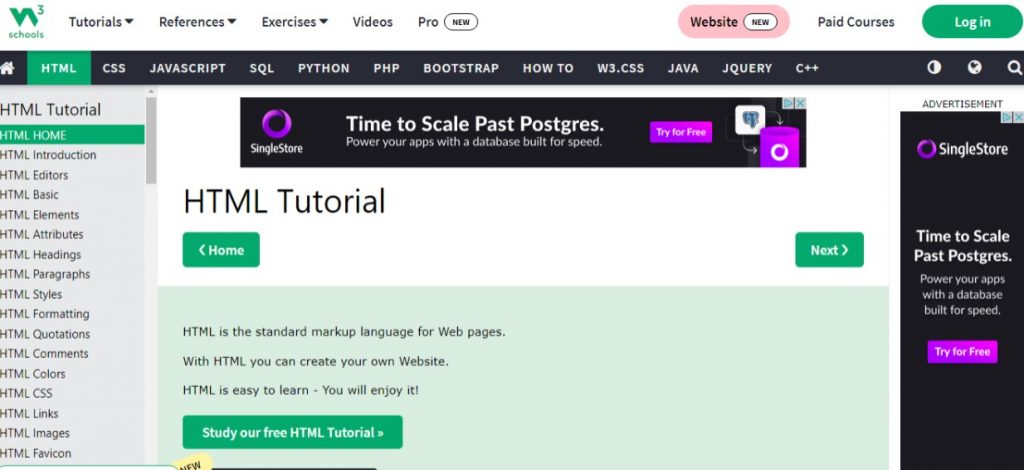
Here you can look up what you’re trying to create, and it will show you how it should look like in code and in another browser window to show a live code view of how it can look on a website screen.
Responsa What? Understanding Responsive Design
Layouts can be tricky. It feels so nice to finally have a design that looks good and works well… until you take a look at it on a different device. What happened to your design?! How can you fix that? The answer…. Responsive Design! Let’s take a look at what it is and some of the basic things to know surrounding responsive design. Let’s go!
Continue reading “Responsa What? Understanding Responsive Design”