These last few weeks in Web Design have been challenging but fun! From the Concentric Design Challenge to creating our Midterm Website Design to our introduction to responsive design, we have been through a lot.
Continue reading “AAD86 – Weeks 7 & 8”I Almost Didn’t Figma it Out!
I found it odd when Professor Bill told me he didn’t know what was going on with my 2nd draft.
Continue reading “I Almost Didn’t Figma it Out!”Sleep is important!
WARNING: DO NOT WORK AND SLEEP
This week I learned the importance of rest in relation to quality of work. With a long work week, I noticed my quality of work I turned in was getting worse and worse. This was because I forced myself to get it all done beofre I allowed myself to rest as a “reward”. But when I finally let myself rest after a days work before diving into hours of homework or midterms, my brain was more awake and my quality of work increased! I really think this impacted the outcome of my midterm site design this week. My working draft I had wasn’t great and definitely not challenging my design skills. Not until later in the week when I was able to catch up on rest did fresh ideas and enthuseasum start to flow!
Be kind to yourself and relax! You will get it done in due time!
Responsive Web Design and UX
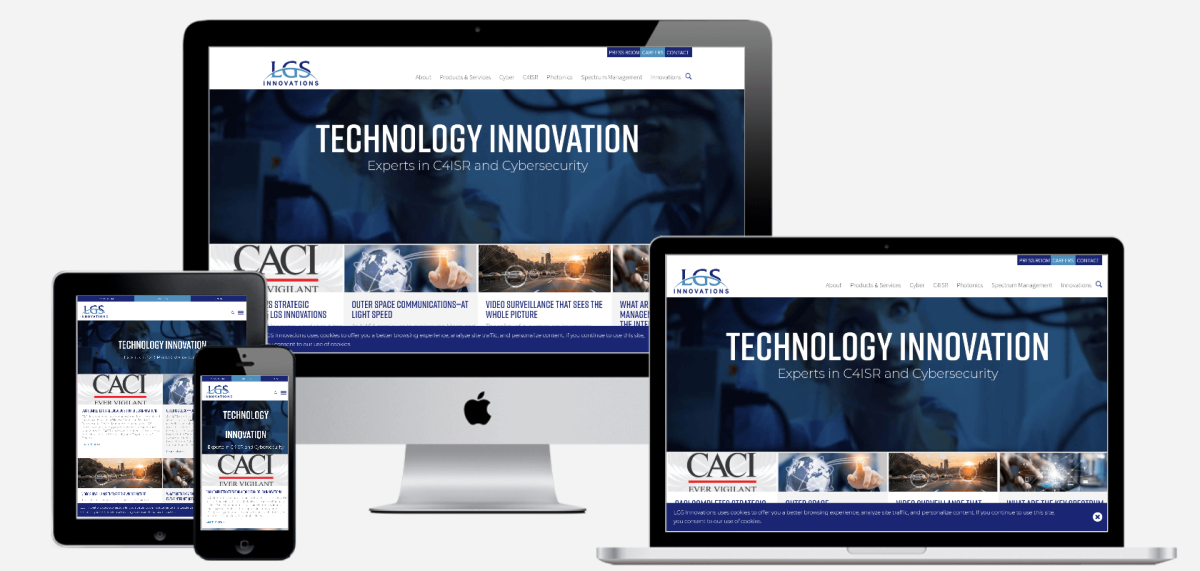
Responsive web design (RWD) refers to designing websites to adapt to a user’s device. The goal is for a website to retain its optimal usability and appearance regardless of the device it’s displayed on. Responsive web design responds to user needs by adapting to different screen sizes, orientations, layouts, and platforms. This is accomplished with the use of flexible grids and layouts, responsive images, and CSS media queries.
Continue reading “Responsive Web Design and UX”Relearning Figma
These last couple weeks, we worked on our Midterm project. For this project, we had to create a microsite design, using either Adobe XD or Figma. I initially started on Adobe XD, but then switched to Figma to finish my project.
Continue reading “Relearning Figma”Wk 7-8: Responsive Design & Midterm
I can’t believe the semester is already halfway over. It feels like the time flew by, but also, I think the course has been paced really well. I haven’t been expected to understand things without having been given adequate time to learn.
Continue reading “Wk 7-8: Responsive Design & Midterm”Lisa’s Learning Journal: Week 8
Is the Semester Halfway Over or Halfway Begun?
The past few weeks of AAD86 have been pretty smooth. It was fun to work through the stages of the midterm project, and I had a lot of fun finalizing my design. The first taste of responsive design was interesting. I think things are going to get a little more complicated moving forward with that. The introduction of indenting in CSS is a little scary since it seems like things can get really messy really fast.
Continue reading “Lisa’s Learning Journal: Week 8”Midterms Already
Time flies when you are having fun!
This week the information about Responsive Design really made some concepts and functions of building a website come together. I have always thought of designing from big to small, but never knew that developing this from small to large would be more efficient!
Personally, this week was huge! I accepted a job, not in Web Design, but see opportunities to possibly use this skill to supplement my work. I am excited….and scared…for this new adventure, but all great things have a little of both. I think this is the perfect formula for an exhilarating future!
Flexbox, Floats, and Responsive Design
Over the last couple of weeks, we practiced using Flexbox and Floats to make the Concentric website. We also had an introduction to responsive design and will submit our midterm design.
Continue reading “Flexbox, Floats, and Responsive Design”Weeks 7 & 8 AAD 86
We’ve covered a lot of new topics over the past two weeks. First, we built a Concentric website using the float model. Then we converted it to flexbox.
Continue reading “Weeks 7 & 8 AAD 86”Turning Designs into Code
In the last two weeks we have been involved in visually designing websites and then practicing various code approaches implementing these designs. For example, along with visually designing our mid-term project website, we practiced various approaches in HTML and CSS.
Continue reading “Turning Designs into Code”Weeks 5 & 6 AAD 86
We have had a lot of assignments over the past two weeks. We have updated our knowledge about floats and flexbox.
Continue reading “Weeks 5 & 6 AAD 86”Wk 5-6: Flexbox & Grid Layouts (Still Good)

Layouts! I remember these being the most intimidating part of Intro to Web Design for me. I felt like I didn’t actually know what I was doing and was just jury-rigging my code to get it to look the way I wanted. This time around, I’m feeling a lot better.
Continue reading “Wk 5-6: Flexbox & Grid Layouts (Still Good)”WK6 – AAD86 Learning Journal
These past two weeks have been a lot of fun and have refreshed a lot from my previous classes.
Continue reading “WK6 – AAD86 Learning Journal”AAD-0086 wk 5&6 – Float, Flex & Grid
With the concentration on the tools of spacial design, we worked with positioning, floats, flexbox and grids.
Continue reading “AAD-0086 wk 5&6 – Float, Flex & Grid”AAD86 – Weeks 5 & 6
Now these past two weeks have definitely been interesting! There was a lot of content I didn’t know previously so it definitely felt like a curveball was thrown in my direction, just not necessarily in a bad way if that makes sense.
Continue reading “AAD86 – Weeks 5 & 6”Stretching to Flex
Flexbox. Just the word brings so much freedom in simple web designs. It allows for placements that I just couldn’t reach without having it in my toolbox.
Continue reading “Stretching to Flex”Mastering the Art of UI Design
User Interface (UI) design is the creative process of enhancing user satisfaction by improving the usability, accessibility, and visual appeal of a digital product. In today’s tech-driven world, UI design plays a pivotal role in shaping our digital experiences, whether we’re navigating a website, using a mobile app, or interacting with software.
Continue reading “Mastering the Art of UI Design”Lisa’s Learning Journal: Week 6
Let’s talk about Flex!
Oh boy. We finally made it to flexbox. For some reason, I never cared for the flexbox layout during AAD85. I thought, “Heck, I can do this whole HTML and CSS thing without it”. I don’t know why I hated flexbox so much. Though, it is most likely because learning flexbox involves change, and change is scary.
Continue reading “Lisa’s Learning Journal: Week 6”Position is a matter of Perspective
To truly design you often have release control to let things flex and float.

Let it go!
https://unsplash.com/photos/LkHXBKpwhZ8utm_source=unsplash&utm_medium=referral&utm_content=creditShareLink
Week 6 of Intermediate Web Design, we focused on positioning elements within a webpage. Often taking elements out of the flow of the document and placing them where we determined they should go. Whether we were floating images to wrap text around them or flexing the elements to put them in a different orientation, we often had to release the control of the parent to move the child.
This week, I found a parallel to my professional and personal life. I have been trying to control the path of my career. I have been trying to make logical steps to move myself along MY imagined path. I came to a point this last week that I literally had to release this control and allow the next steps to fall as they are designed to, I had that moment of realization that I am not The Designer of all the twists and turns of my path, but it will go the way it should go. Sometimes the design is revealed by letting go and letting things fall into position.