Equity Mobile App Case Study
By Elisa Roberts
Overview
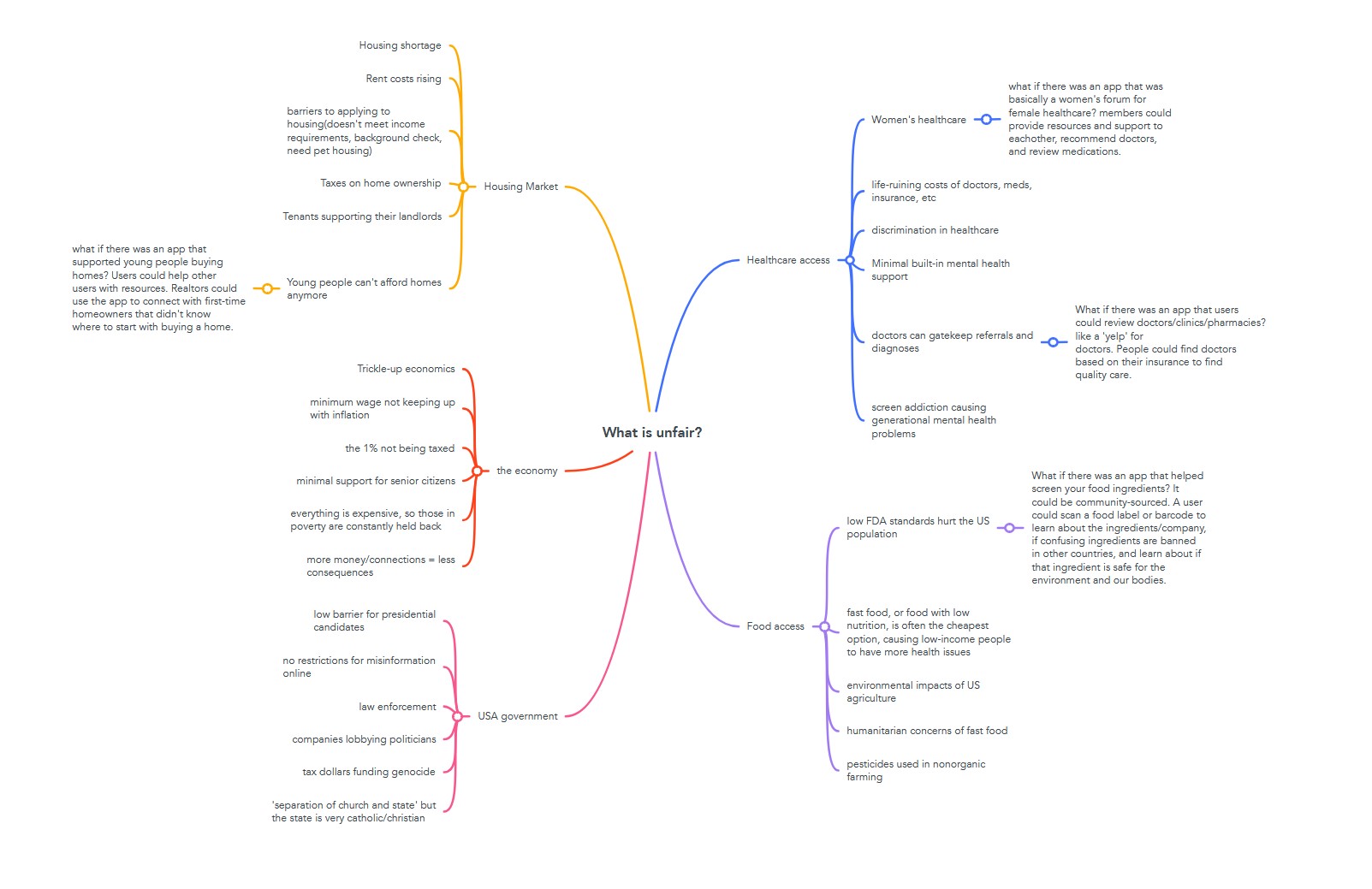
In the United States, the FDA allows food production standards that contribute to widespread health issues. Harmful ingredients in processed foods are linked to conditions ranging from metabolic disorders to cancer. Many consumers remain unaware of these risks due to a lack of accessible and reliable information. Furthermore, the affordability and convenience of unhealthy options disproportionately impact low-income and college student populations, exacerbating health inequities. Target Audience This app is designed for college students and individuals with limited financial and time and resources. These users often face unique challenges, such as:
- Balancing a busy schedule with the need for quick, affordable food.
- Limited awareness of harmful ingredients and their health implications.
- A desire for simple tools to help them make informed grocery shopping decisions.
The app will also appeal to health-conscious users looking for accessible, evidence-based guidance.
UX Research
-
Target Audience
This app is designed for college students and individuals with limited financial and time resources. These users often face unique challenges, such as:
- Balancing a busy schedule with the need for quick, affordable food.
- Limited awareness of harmful ingredients and their health implications.
- A desire for simple tools to help them make informed grocery shopping decisions.
The app will also appeal to health-conscious users looking for accessible, evidence-based guidance
-
Market Analysis
Existing apps like Yuka, Fooducate, and EWG’s Healthy Living offer ingredient scanning but lack focus on affordability, time efficiency, and student-friendly features. Many apps provide general information but do not tailor their content to specific user needs like budget constraints or quick meal planning.
-
Competitor Gaps
- Lack of localized information on where to buy safe alternatives.
- Insufficient focus on budget-friendly recipes or quick, healthy snack options
- Minimal integration with user preferences like dietary restrictions or personal goals.
-
User Needs
User interviews highlighted the desire for:
- Educational content on harmful ingredients with clear, science-backed explanations.
- Alternatives for unhealthy products, with easy navigation and price-conscious options.
- Tools to save time, like grocery lists or store-specific maps for healthy product availability
-
Value Proposition
This app differentiates itself by focusing on time, affordability, and education:
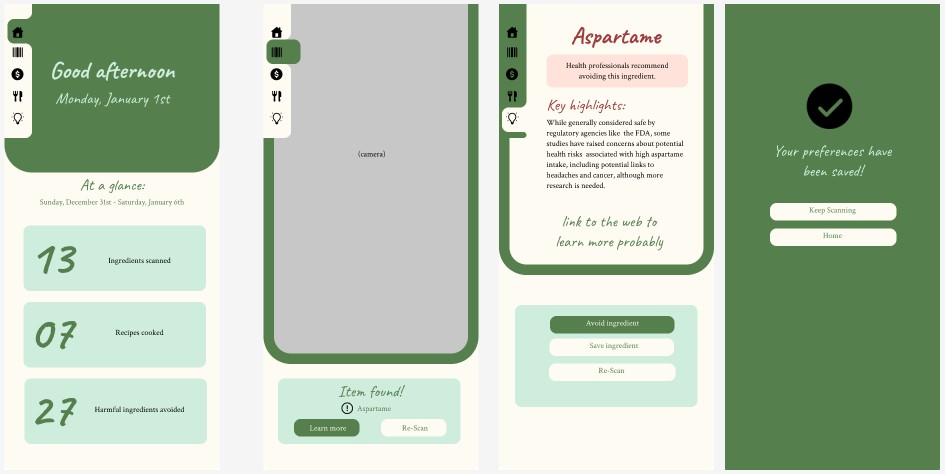
- Ingredient Scanner: Users can scan barcodes to identify harmful ingredients and tap to learn more about their health effects, backed by reliable sources
- Alternative Suggestions: Provide healthier, budget-friendly product recommendations with user reviews and store availability
- Time-Saving Features including grocery list generation and store mapping.
- Education First: Offers concise, science-based blurbs about ingredients, empowering users with knowledge
- Nutrition Awareness: Users can hit protein intake on a time and financial budget
- Budget Focus: Tailored for users with limited financial resources, featuring recipes and snacks that are both affordable and quick to prepare
-
Addressing Equity Issues
This app aims to close nutritional and health disparities by:
- Empowering Informed Choices: Education on ingredient safety allows users to advocate for their health, reducing the burden of systemic food inequities
- Affordability: Prioritizing cost-effective, healthy options makes nutritious eating accessible to low-income users.
- Accessibility: Designed for mobile use, ensuring that anyone with a smartphone can benefit from its features. Additionally, recipes and alternative suggestions will accommodate a range of dietary needs, including vegetarian, vegan, and gluten-free options
App Design
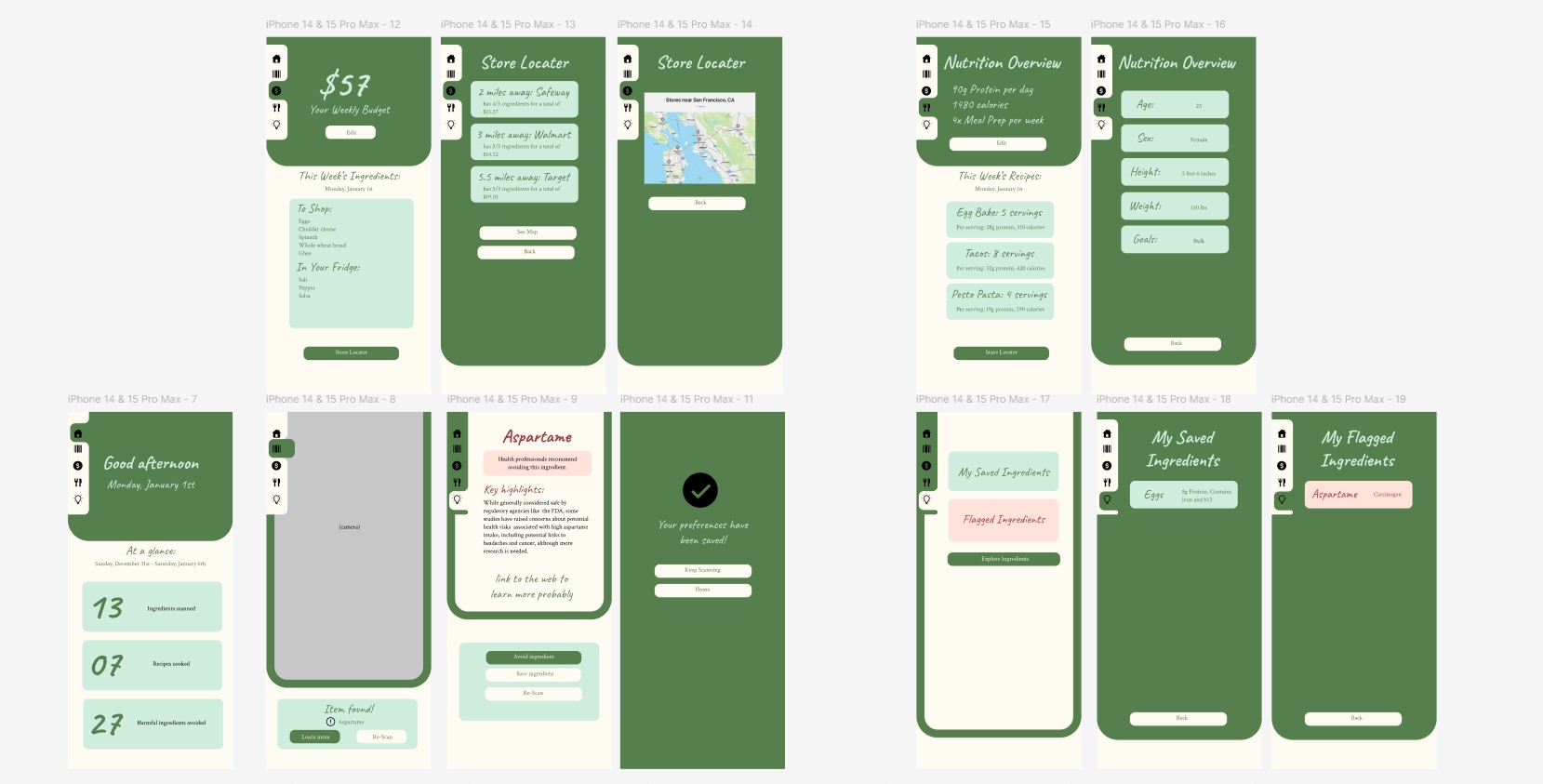
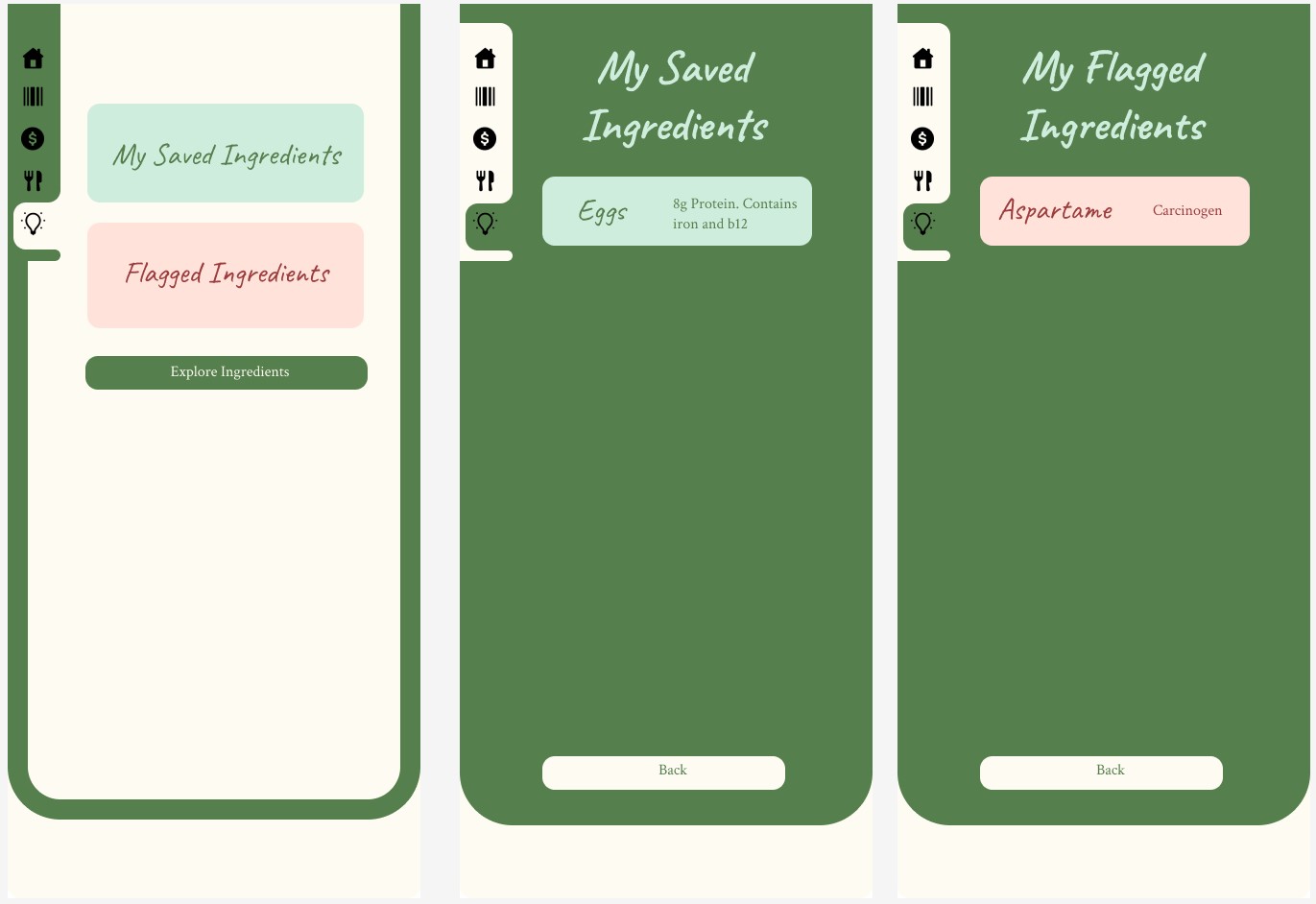
To design my app, I looked at different diet trackers and health food apps. Then I tried to make it feel familiar but modern. The menu icons are always present and indicate which menu the user is in. I tried to include numbers like budget and 'ingredients scanned', to give the user a sense of accomplishment and direction.
Tasks
Within the app, users can:
- Scan ingredients: Tap 'scan', Scan ingredient barcode, read info, and organize ingredient.
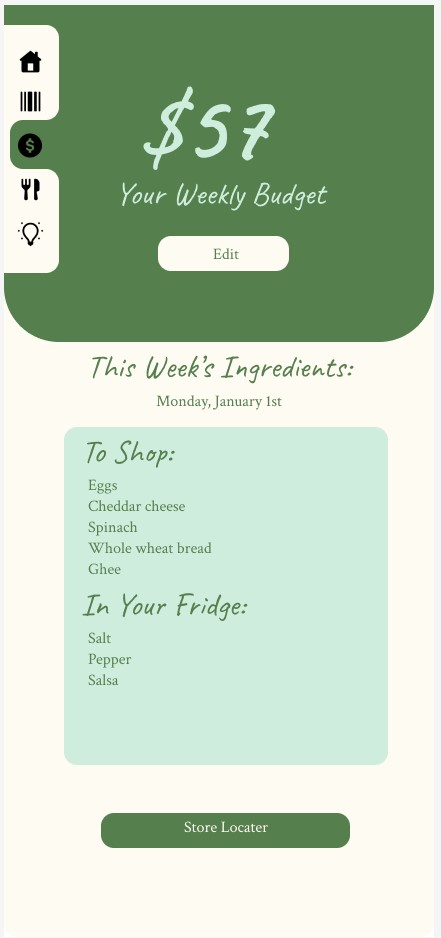
- Budget: input monthly grocery budget, enable location to find nearby grocery stores, review ingredient shopping list/recipes, view ingredients at best cost, customize shopping list.
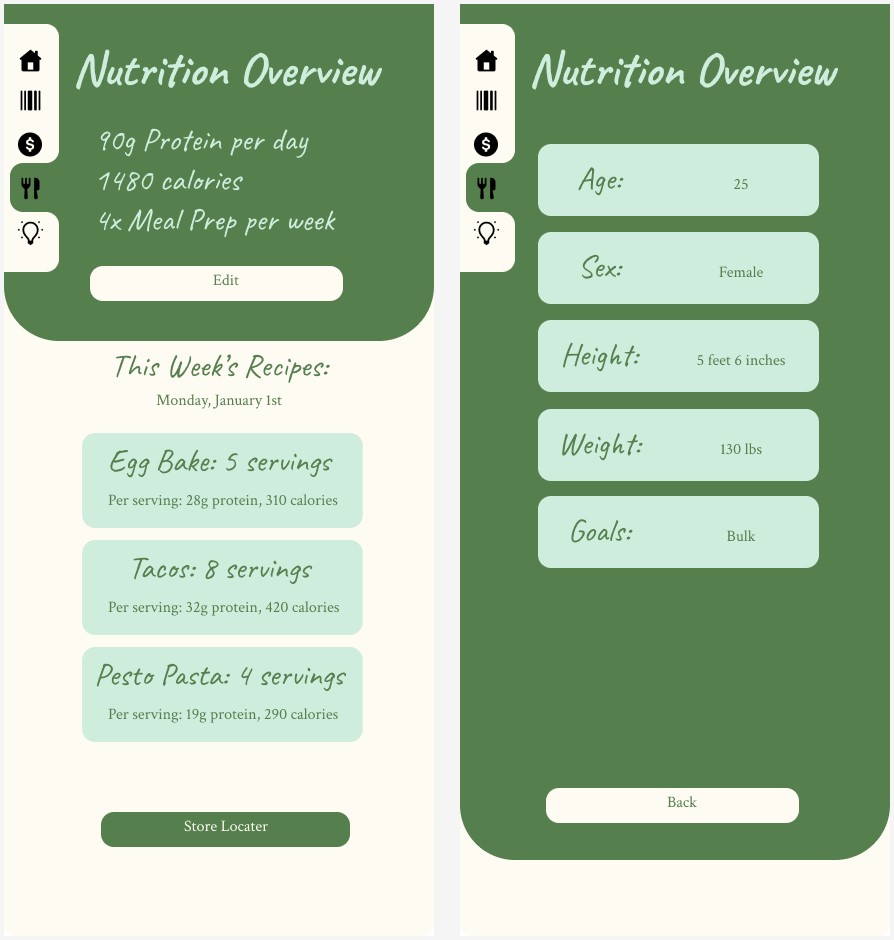
- Save Recipes:View an overview of budget, diet, preferred stores, and time allowance, see a list of recipes to fit criteria and hit nutrition goals, and select recipes to create shopping list, or view recipe.
- Learn:Scroll through categories of ingredients, or look at previously saved, tap ingredient to view the ingredient profile including benefits or risks, and save ingredient or tap 'avoid', or tap 'alternatives
Summary
I really enjoyed thinking through the problems and puzzles with this app and I think it would be a great first draft. It felt rewarding to start prototyping and see all the work and research I had done start to flow together. If I had more time I would probably illustrate icons and make it feel more customizable with organizing ingredients and tailoring meal plans. It was quite difficult for me because every time I felt like I had solved one problem, three more would come up. I feel like I could spend years improving this design, but I am happy with my concept and progress.