Charge! Case Study

EV Route Planner   •   Alex Sawicky   •   designs@alexsawicky.com

Project Overview

Problem Statement

As electric vehicle (EV) adoption rises, EV drivers face a fragmented ecosystem for navigation and charging. Tesla owners benefit from Tesla’s proprietary navigation, but limited compatibility and data-sharing make route planning challenging for other EV drivers. Many non-Tesla EV apps offer route planning, but few unify multiple charging networks, real-time data, and customizable user experiences. This lack of integration creates range anxiety and limits drivers’ flexibility, especially across EV brands. An app that universally covers route planning and charging data could significantly ease the EV driving experience, reducing range anxiety and making long-distance EV travel more accessible, ultimately contributing to sustainable energy practices.

Target Audience

Our target users are EV drivers with any EV model, particularly those without seamless access to charging station data through their in-car systems.

  Additionally, we will aim to support environmentally conscious consumers who are new to EV driving and face difficulties navigating charging infrastructure.

Equity and Universal Design

Addressing equity is central to “Charge!” by prioritizing accessibility across all EV models and brands, thereby democratizing EV travel. With consistent data across rural and urban areas, the app will bridge coverage gaps often found in underserved areas, ensuring reliable information regardless of geography.

  The app’s user experience will also focus on simplicity and adaptability, catering to both novice and experienced EV drivers with progressive disclosure of features and customization options.

Solution Statement

“Charge!” will combine real-time charging station data, dynamic route planning, and a community-driven feedback system to deliver a user experience that unifies the best features of current EV navigation apps.

  By using data-driven insights and intuitive design, “Charge!” will empower EV drivers with seamless access to essential information, making long-distance EV travel more convenient, inclusive, and efficient.

Project Research

Based on an analysis of several existing EV navigation apps like Tesla infotainment, ABRP, and ChargeHub, we identified key strengths, limitations, and opportunities within the EV navigation ecosystem:

  • Tesla excels with 1st party integration, but lacks information on charging locations from other brands
  • ABRP offers extensive customization and route planning, but has an unnecessary complex UI
  • ChargeHub adds community-driven insights, but lacks a user-friendly UX

All apps we looked at have limitations, such as limited data in specific regions, reliance on third-party sources, and limited coverage across non-Tesla EVs. There is a clear demand for a universally compatible app that integrates multiple charging networks, supports all EV models, and offers real-time information on charging station status, availability, and cost.

  “Charge!” will leverage real-time data, comprehensive charger databases, and community-driven insights, providing an efficient, adaptable EV navigation tool that centralizes information for all EV users.

App Design


Our app's design is founded in many existing apps which Charge! aims to unify into a single app. The app combines vehicle data and controls from Tesla, an aesthetic and color palette from Rivian, and a design language and iconography from Google Maps and Material Design 3.

  The goal during UI/UX development was to mimic the design language of an existing navigation app. We chose to use Google Maps as a style reference as it is a popular app that will feel familiar. Also, Google makes their design system and iconography open source.

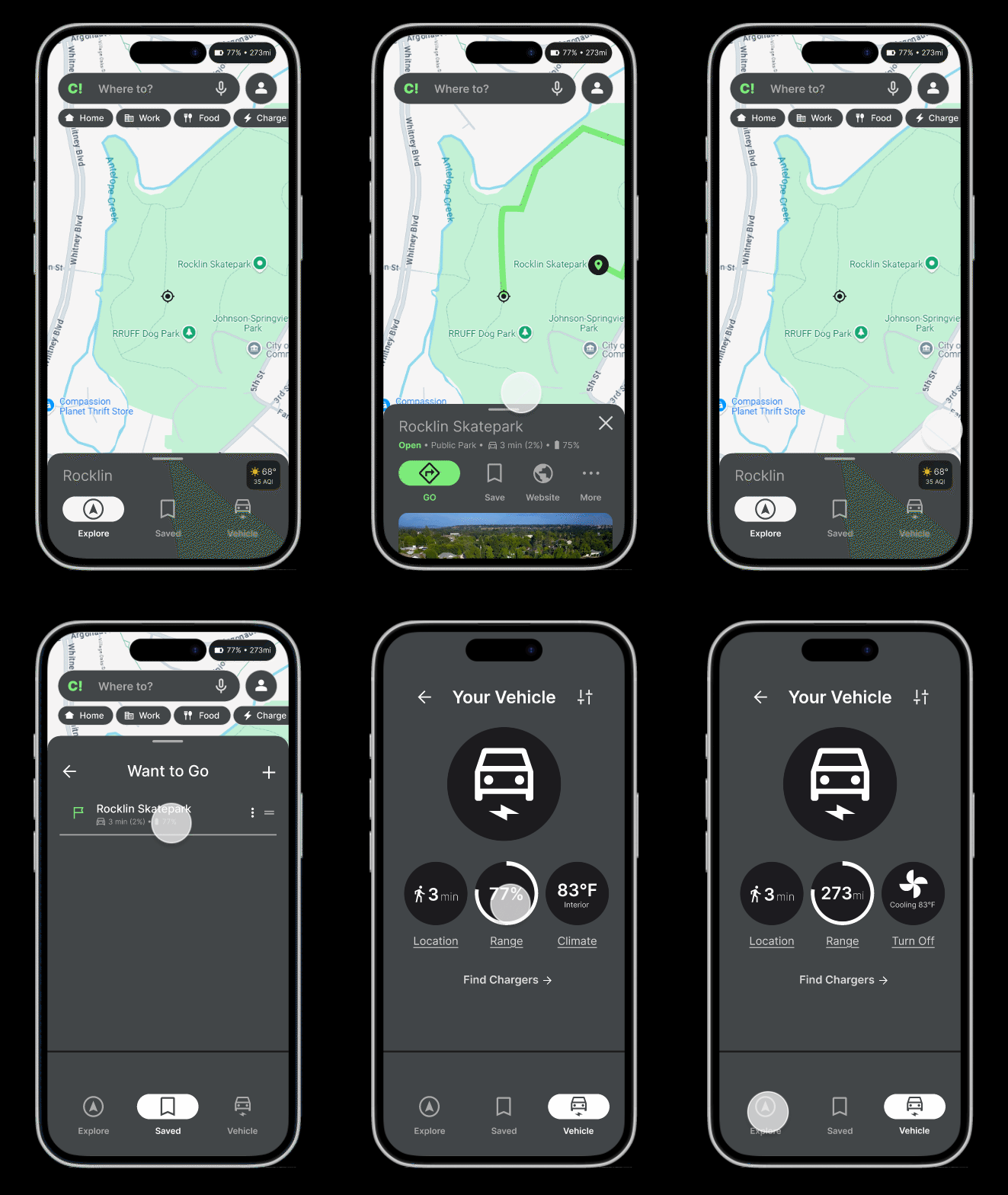
  Charge! builds on a Google-maps style template and adds features designed for EV drivers. Features like battery management, live vehicle range and range on arrival, charger search, and favorite charger stops were deeply integrated to make Charge! feel like navigation software created for the EV driver.

Tasks For Users

Visit the Charge! Figma Prototype to get a feel for how the real app would look in feel.

Below are some of the main ways we expect users to engage with our app:


1. Navigate to a destination

Search for a destination or choose one from the map ("explore"). Read the destinaion details and hit GO to get turn-by-turn directions.

2. View saved destinations

Under the "saved" tab you can view saved destinations and even begin navigation.


3. Find nearby chargers

The "charge" button below the search bar will bring up a list of nearby chargers, sorted by distance, with accompanying details (e.g. charger brand, charging cost).

4. View live vehicle data and control your vehicle

Under the "vehicle" tab, you can see your EV's current range in % or miles, control your A/C, and get walking directions to your car.

Usability Testing & Further Development


  Overall, the participants reported that the design was visually pleasing and minimal and/or “not in your way”.

  There were mixed opinions on how intuitive the prototype felt, but everyone reported they were eventually able to “figure it out”.

  The most frequent piece of advice given was to increase the amount of interactable elements and add more, rich information to help the prototype feel more realistic.


  The long term goal for Charge! is to achieve complete feature parity with every major EV manufacturer's app (e.g. Tesla, Rivian) combined with comparable or equivalent functionality to popular navigation apps (e.g. Google, Apple Maps).

  Eventually Charge! will be the bridge that unifies every major EV charging station brand (e.g. Tesla, Rivian, ChargePopint, ElectrifyAmerica) into a single, user-friendly navigation app that contains rich, live data. For the EV driver, Charge! will replace both Google/Apple maps and their vechicle manufacture's mobile app.

Summary

Charge! EV Route Planner is a prototype concept of an app that will solve the problem with our current EV charging infrastructure: there are too many charger providers.


  Charge! takes all of the best parts of the Tesla Supercharger network (like route planning based on on-route cars, live per-station pricing, and "plug and play" pricing) and includes chargers from every other network.


  Regardless of what EV you drive, Charge! will give you the same seamless charging experience Tesla has provided to their customers for over a decade.

This project taught me how to use Figma for design and prototyping. I learned that creating a complex prototyping can be daunting, but with careful planning and use of online tools, creating a prototype can be an efficient and rewarding experience.


  I was also able to gain experience using design best practices, and I feel like I now have a much better understanding of how to properly design for usability and accessibility.


  Additionally, I learned how to properly conduct UX research. This project emphasized the importance of collecting valuable feedback from potential users during every step of the design process.

The part of this project I am most proud of is actually the case study. I put a lot of work into the Figma prototype and seeing it all laid out on a website is very satisfying. I feel very proficient in Figma, but CSS/HTML is still a learning process. Creating this case study page helped me get more practice with, and feel more confident in my web dev abilities.

  For me, the most challenging part of this project was iteration. I felt discouraged from making changes to the design later in the project as I would need to go back and modify multiple screens in the prototype to change one element.

  The most rewarding part of this project was when Figma finally "clicked". I knew about the design tool before this class, but I found it redundant to render a design in Figma they create it all over again in code. Now, I can see the benefits of prototyping and can't wait to get started on my next personal project!